Skip to content

Press ESC to close

Or check our Popular Categories...

Professional work

Smart City AI Assistant

An embedded, multi-tenant AI experience that brings relational data, documents, and existing smart-city systems behind a shared integration entry point.

My role
Product, architecture & technical delivery
Context
Surbana Jurong · Smart-city platforms
Focus
Embedded access · Tenant onboarding · Integration

Inside the product

From operational questions to asset context and workflows.

Explore the conversational interface, digital-twin views, and visual workflow editor. The digital-twin screens demonstrate asset inspection with simulated telemetry.

01 · Conversational analytics

Ask a question. Inspect the data behind the answer.

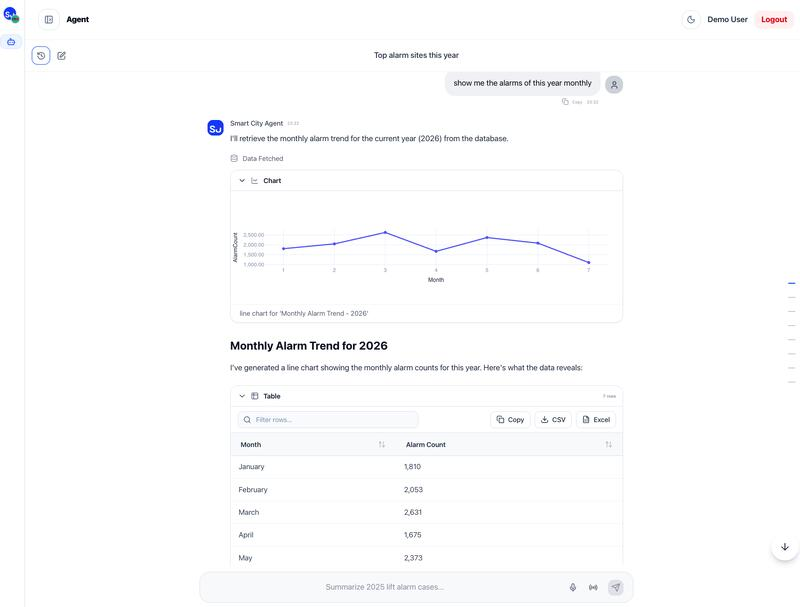
A request for monthly alarm counts produces an explanation, a trend chart, and a table in the conversation. The interface combines a readable answer with results that users can inspect, filter, and export.

User task: Review alarm trends without moving between a chat interface and a separate reporting screen.

Smart City Agent conversation showing a monthly alarm trend chart, an explanatory response, and a table with filter and export controls.
Monthly alarm analysis presented as a conversation, chart, and inspectable table. View full size

02 · Digital twin

Put equipment information in its building context.

An asset tree and selectable 3D geometry help users locate equipment in the building model. The selected asset's panel brings together its identity, operating values, status, and nameplate information. An “Ask about this asset” action offers a path back to a question about that equipment.

User task: Move from a building overview to a specific lift, chiller, or cooling tower and inspect its context.

Demo with simulated telemetry

Digital Twin Viewer with Passenger Lift 2 selected in a 3D building, an alarm status, equipment information, and an Ask about this asset action.
Lift inspection demo: the selected lift is highlighted in the model, with an alarm and equipment details alongside it. Values shown are demonstration data. View full size
Chiller plant model with Chiller 2 selected, an asset tree, and a panel showing cooling load, power, efficiency, temperatures, and nameplate details.
Chiller inspection demo: plant geometry, asset selection, and operating values in one view. Simulated telemetry. View full size
Cooling Tower 1 highlighted in a 3D building model with fan speed, inlet and outlet temperatures, and nameplate details.
Cooling tower inspection demo: a selected rooftop asset with its operating and nameplate information. Simulated telemetry. View full size

03 · Workflow automation

Make the steps of an operational workflow visible.

The visual editor shows routing, a PostgreSQL query, an item loop, and an email action as connected steps. Configuration panels, step testing, and a runs entry make the workflow easier to inspect while it is being configured.

User task: Configure and review a notification flow by following its individual actions and branches.

Smart City workflow editor showing a router, PostgreSQL query, loop on items, and Send Email action with its configuration and test controls.
A notification workflow showing connected actions and the email step's configuration and testing controls. View full size
Two client portals embed the JavaScript SDK. A shared REST entry connects microservices on EKS Fargate with per-tenant source onboarding, relational databases, documents, CFEMS, and RAPID.
Functional view of portal embedding, tenant onboarding, and source integration.Open full-size diagram

The product was an integration problem as well as an AI problem

Clients already had portals and operational systems. Their information was distributed across relational databases and document sources, and each tenant needed its own sources brought into the platform. The delivery therefore had two connected parts: a conversational experience for users and an integration platform that could be onboarded for different clients.

I owned the work from requirements and prototype-led tooling evaluation through solution architecture, delivery, and client onboarding. That scope connected early product decisions to the implementation and rollout.

Embedded access, shared integration, tenant-specific sources

Client experience · JavaScript SDK
The experience was embedded in each client's existing portal through a JavaScript SDK. This kept the point of access within the environment users already worked in.
Application entry · REST APIs
A shared entry point exposed the platform's integration capabilities through REST APIs. Existing systems, including CFEMS and RAPID, were consolidated behind that entry point.
Service delivery · EKS Fargate
The application was delivered as containerized microservices on EKS Fargate, connecting application delivery with the platform's integration responsibilities.
Source onboarding · Per tenant
Relational databases and document sources were onboarded for individual tenants. Client onboarding formed part of delivery ownership alongside the platform implementation.

From prototype evaluation to client onboarding

  1. Understand the client contextIdentify the existing portal, operational systems, and data sources that the experience must connect.
  2. Evaluate tooling through prototypesUse prototype-led evaluation to inform the platform architecture and delivery approach.
  3. Deliver the shared platformBring the REST integration entry point, containerized services, and embedded SDK experience together.
  4. Onboard each clientConnect the tenant's data sources and integrate the experience into its existing portal.

The important delivery distinction is between building a shared platform and making it usable in each client's environment. Both were within my role.

What the delivery brought together

The resulting platform combined a conversational interface, tenant-specific source onboarding, integration with existing smart-city systems, and portal embedding. It demonstrates product ownership through architecture and implementation, with client integration treated as part of the product.

CFEMS provides a complementary view of the operational systems involved: read the commuter monitoring case study.

Let's connect

Have a complex problem to solve?

Let's talk about software, architecture, applied AI, or technical delivery.

Get in touch